
Your digital business card in Apple Wallet and Google Wallet
CARTLY lets you add each digital business card directly to Apple Wallet or Google Wallet. Your employees share their card from their phone, without opening an app, even without an internet connection.
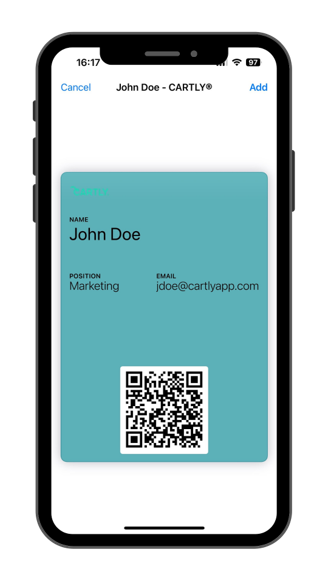
Two Wallet passes for two use cases
CARTLY generates two types of Wallet passes. The first displays a QR code linking to your digital business card online — your contact accesses the full card as soon as they have a connection. The second displays your contact details directly in the Wallet app, accessible from the phone lock screen without an internet connection.
Ideal for field teams, traveling sales reps, and attendees at professional events and trade shows.
Add to Wallet in one click from the digital business card
From the CARTLY digital business card page, your employee clicks “Add to Apple Wallet” or “Add to Google Wallet.” A pass is immediately added to their Wallet app. No additional installation required.
Updates depend on the pass type
The QR code pass always links to the current online version of your digital business card — any change in CARTLY is reflected immediately. The offline pass, however, displays the information stored at the time it was added. If contact details change, it needs to be re-added to show the updated information.